Architecture & Trust Boundaries
This page shows exactly where PDF processing happens and what our backend can or cannot access.
1) Browser vs server boundaries
User browser
pdf-lib · pdfjs-dist · @cantoo/pdf-lib (Web Workers)
All PDF bytes stay in this tab. They are not uploaded for processing.
Only auth, subscription state, and payment events cross this line. Your file contents do not.
Firebase Auth + Cloud Firestore
Login sessions and subscription records, not your PDFs.
webhookStripe → Firebase (webhook)
Stripe Checkout / Customer Portal
Card and billing events, not your PDFs.
The important line is simple: PDF bytes stay in your browser tab and never travel to our backend.
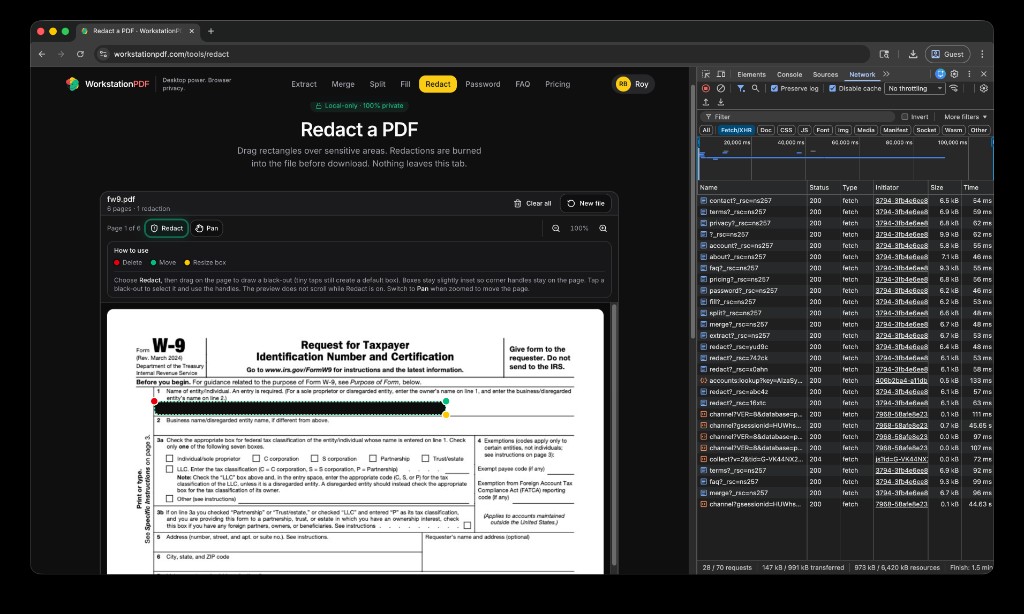
2) Verify it yourself in DevTools
- Open WorkstationPDF in Chrome, Edge, or Firefox.
- Open DevTools and go to the Network tab. Enable Preserve log.
- Filter requests by
pdf(or filter byFetch/XHR). - Run a tool operation like Redact or Merge.
- Confirm there are no outbound requests containing your document bytes, filenames, or page content.
Expected result: auth/subscription/payment requests may appear, but PDF payload upload requests should not.
3) What our backend can see
- Firebase Auth: email address + user UID for login/session management.
- Cloud Firestore: account tier, billing state, and product entitlements.
- Stripe: payment and subscription events handled in Stripe Checkout/Portal.
- PDF data: NEVER. We do not store, inspect, or process your PDF file contents server-side.
4) Source-available engine
A dedicated source-available repository for the core PDF engine is planned for Q2.
Repo link: github.com/LRBLACK (Coming Q2)